How I Migrated From iCloud To A Personal Photo Cloud At Home
For years, my photo and video library kept growing quietly in the background.
At first, iCloud felt like the obvious choice. Tap upload, forget about it, move on with life.
Then one day I realized I was no longer paying for convenience. I was paying a premium to keep years of memories inside a system that was getting more expensive and harder to leave every month.
When your library reaches multi-terabyte size, the conversation changes. It is no longer "where do I keep my photos?" It becomes "how much control do I have over my own data, and how painful will it be to move if I need to?"
This post is the full story of how I moved from that setup to a personal photo cloud architecture:
- Ente as the photo app layer
- TrueNAS as the primary storage backbone at home
- Offsite backups for recovery confidence
I will cover what led to this project, why I changed direction, the exact build steps I took, and the final stack and hardware summary.
What Preceded This Project
My library was not just "my camera roll." It was years of personal memories, family photos, and videos collected across devices and eras. Over time, it became a high-stakes data set:
- too large to casually move
- too important to lose
- too expensive to keep scaling blindly in cloud tiers
I had already gone through painful migration and consolidation work in iCloud, and that surfaced two realities I could not ignore:
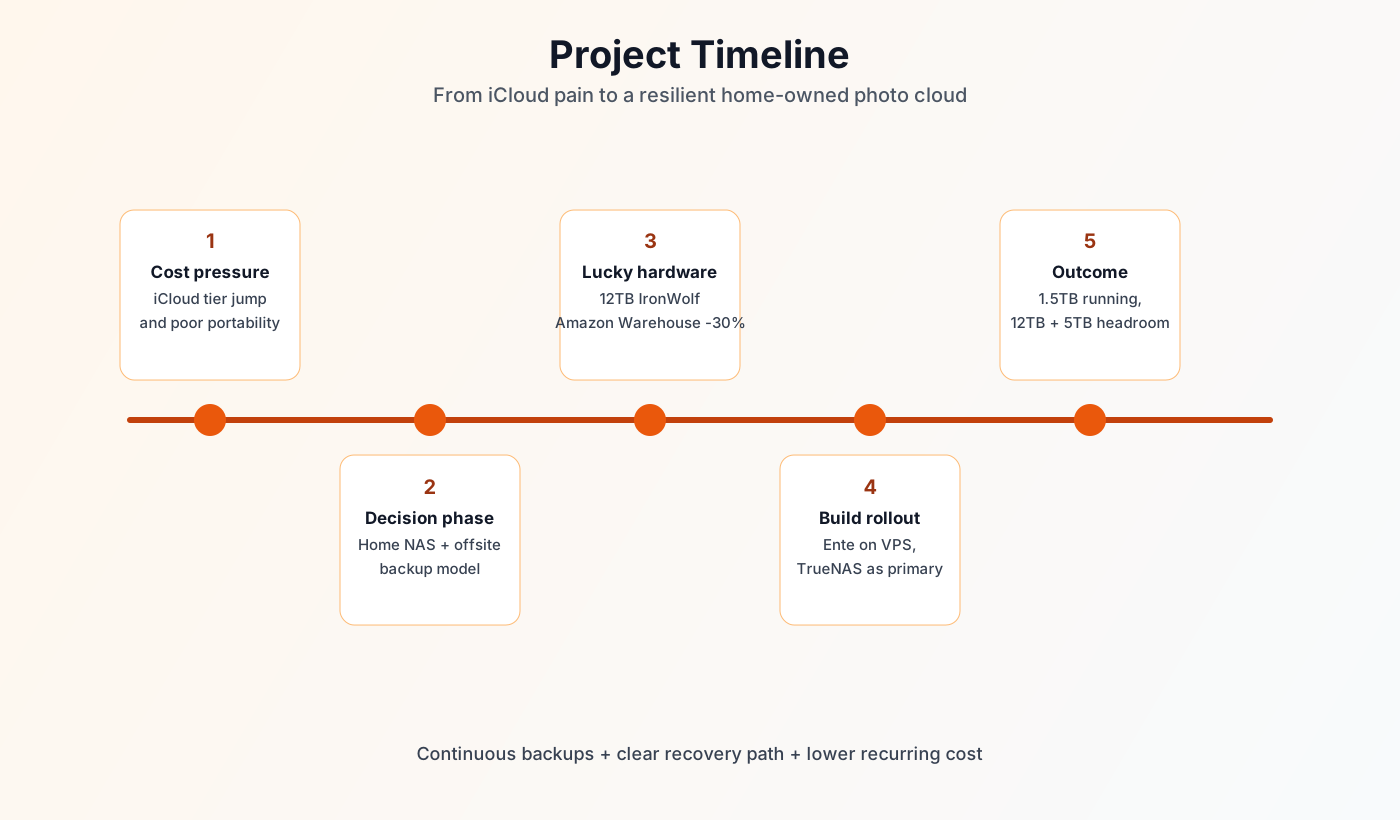
- Cost scales faster than expected.
- Exit gets harder as your library grows.
That was the turning point. Once my library moved beyond the "comfortable cloud tier," I started planning for a home-owned storage model with backups I could reason about.
The Core Problem: Cost And Portability
The short version is simple: iCloud became a bad fit for my data volume and operating model.
I posted about this directly on X:
- "Apple rips you off when your iCloud storage goes above 2TB... It is time to host my photo/video library myself"
https://x.com/yborunov/status/2042625724905840989 - "If I was to give advice to anyone with iCloud Photo Library, migrate before your library grows to 1TB+"
https://x.com/yborunov/status/2043086456869056630
The deeper issue was not only monthly price. It was the combination of:
- expensive tier jumps
- long export/download time for originals
- operational friction when trying to migrate at scale
When storage is both expensive and hard to move, your risk profile changes.
Why I Decided To Build A Personal Photo Cloud At Home
I wanted to optimize for five things:
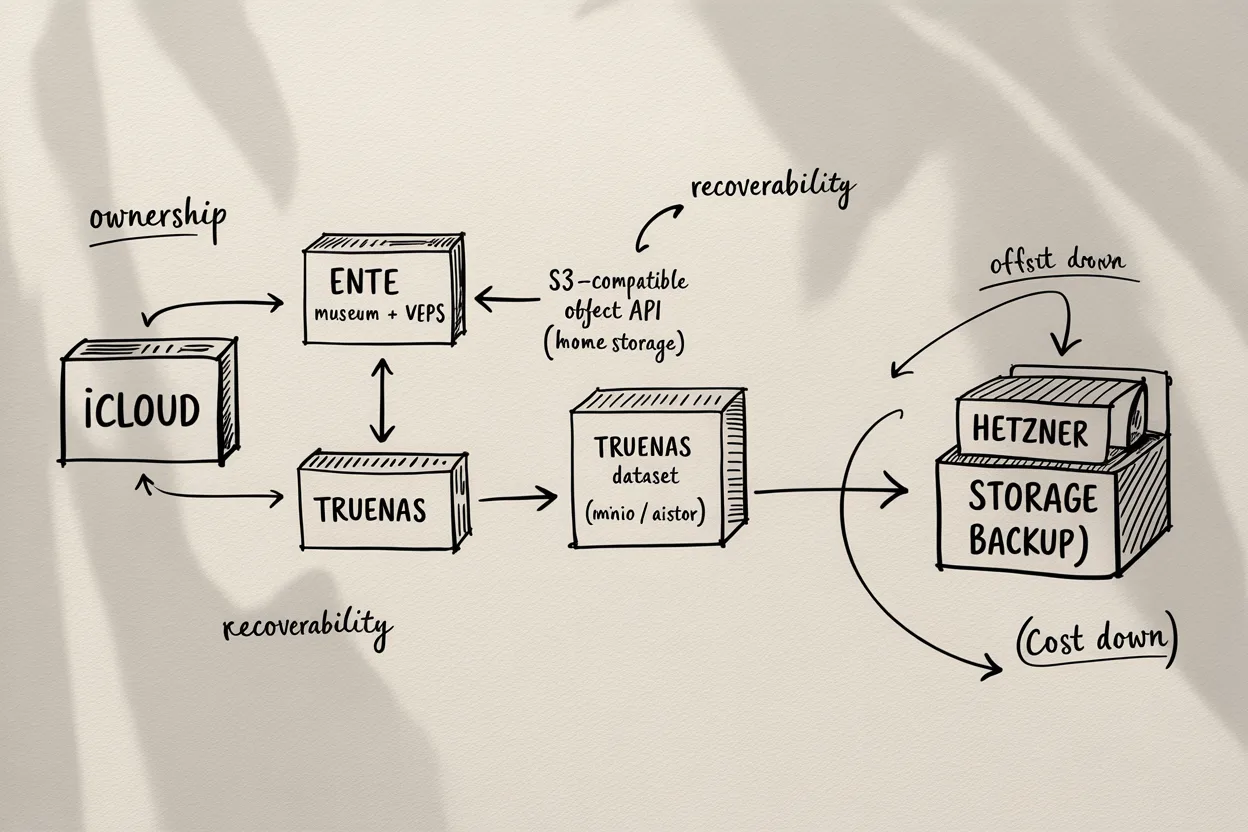
- Ownership: I control the primary storage location.
- Predictability: costs scale with hardware, not opaque cloud tier jumps.
- Portability: I can move data between systems on my terms.
- Recoverability: backups are part of the design, not an afterthought.
- Extensibility: I can grow capacity as needed for years.
I did not want to abandon cloud completely. I wanted a better split:
- home NAS as the primary source of truth
- cloud as an offsite protection layer
That balance gave me what iCloud alone could not: control plus resilience.
Architecture I Chose
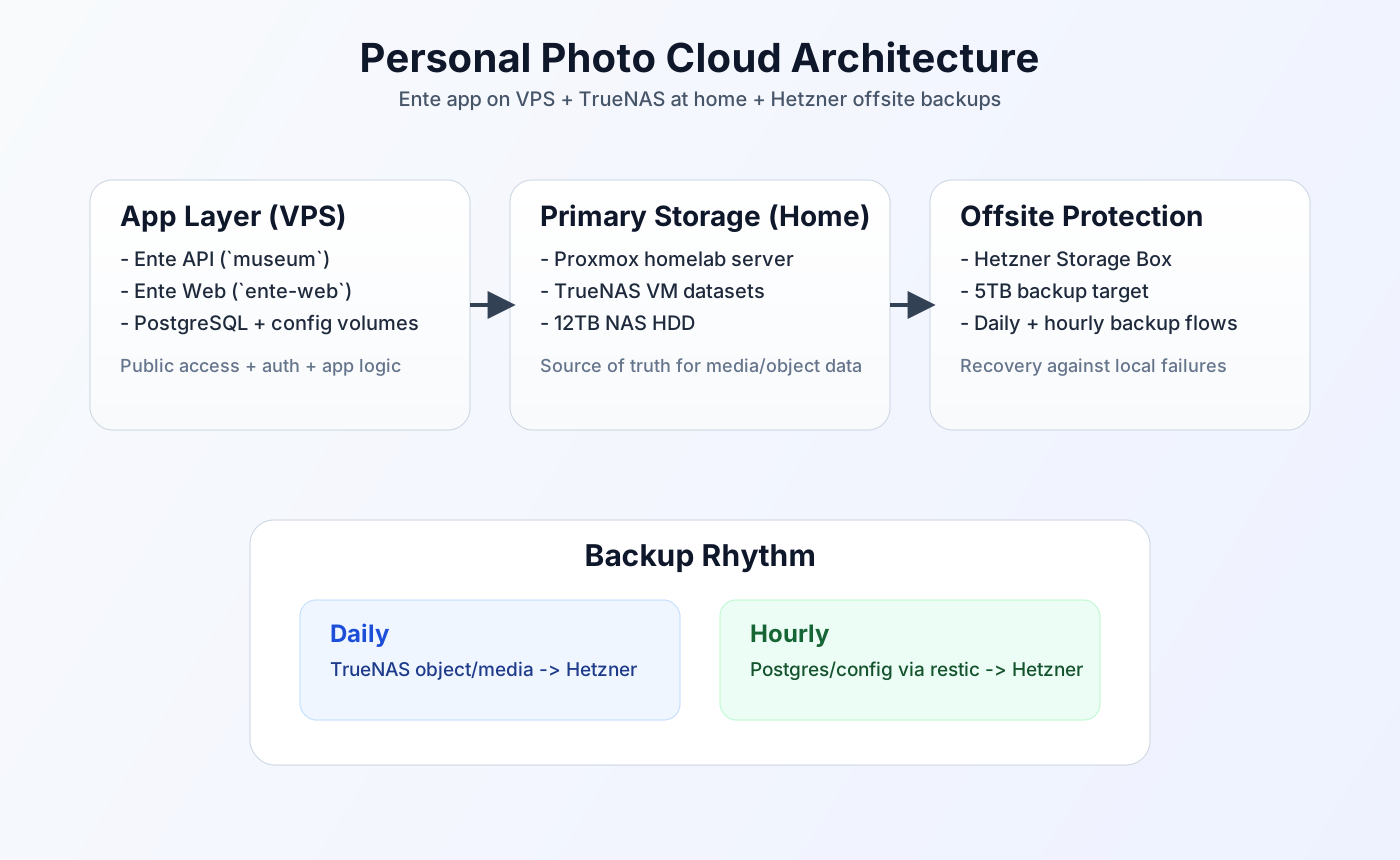
I settled on a hybrid self-hosted architecture:
- Application layer: Ente (self-hosted) running on my home lab VPS via Docker
museum(API)ente-web(web UI)
- Primary storage layer: TrueNAS dataset in TrueNAS machine
- Object API layer: TrueNAS app (MinIO, or AIStor-equivalent) exposing that dataset via S3-compatible API for Ente
- Database/config layer: PostgreSQL + Museum config volumes on VPS
- Backup layer:
- TrueNAS-managed object data backed up daily to Hetzner Storage Box ($13 for 5TB)
- PostgreSQL + config backed up hourly with restic to Hetzner Storage Box
This gave me clean separation:
- compute where it is easy to expose and manage (VPS)
- data where I want long-term ownership (home NAS)
Step By Step: What I Actually Did
Step 1: Defined The Migration Goal And Constraints
Before touching infra, I wrote down constraints:
- preserve original media quality
- avoid one-shot irreversible moves
- maintain at least one safe rollback path
- keep backup from day one
This prevented me from treating migration as a single risky cutover.
Step 2: Prepared NAS Capacity For Long-Term Growth
This step had the most emotional moment in the whole project.
At the time, NAS drives were getting expensive fast because of storage pressure from the AI training rush. Prices felt like they were climbing every few weeks.
For a while, I had a small morning ritual: wake up, open Amazon, check NAS SATA HDD prices, close tab, repeat the next day.
Then one morning I got lucky.
I saw an Amazon Warehouse listing for an IronWolf 12TB NAS-grade SATA drive marked as used, priced about 30% lower. I did not overthink it. I pressed buy immediately.
When it arrived, it was basically like new. The package had minor signs of being opened, likely a customer return, but the drive itself was in excellent shape.
That deal mattered a lot. During a period when storage prices were almost doubling over a few months, getting a clean 12TB NAS drive at 30% off felt like a huge win. I was genuinely happy that day because it gave this whole migration plan real momentum.
On X I shared the key milestone:
- "I managed to get a 12TB NAS-grade HDD for my home TrueNAS... migrating iCloud Photo library... connected to self-hosted Ente"
https://x.com/yborunov/status/2043084868075114804
At this stage I focused on practical outcomes:
- enough capacity headroom
- reliable dataset structure
- clear intent for offsite backup continuation
Step 3: Deployed Ente Services On VPS
I deployed self-hosted Ente components in Docker on home lab VPS via Proxmox VE:
- Ente API (
museum) - Ente web frontend (
ente-web)
This handled auth, app logic, and front-door access while keeping heavy data on NAS-backed storage.
Step 4: Connected Ente Data Path To TrueNAS Storage
I connected Ente's object path to TrueNAS through an S3-compatible app layer.
- TrueNAS dataset stays the physical storage location
- TrueNAS app (MinIO, or AIStor-style equivalent) exposes that dataset as S3 API
- Ente
museumwrites and reads media objects through that S3 endpoint
So even though Ente talks S3, the bytes still land on my TrueNAS-owned disks.
This was the real ownership shift: app in one place, durable storage in another, both under my control. That was the moment it stopped feeling like a "setup" and started feeling like my own cloud.
Step 5: Designed Backup As A First-Class System
I treated backup as part of initial architecture instead of "later":
- object/media storage protected from NAS side to Hetzner Storage Box (daily)
- DB/config protected from VPS side with restic to Hetzner Storage Box (hourly)
That split mattered. Media and metadata have different change profiles and failure modes, so I backed them up with separate workflows.
Step 6: Validated Recoverability Thinking
I documented recovery runbook ideas and backup flow assumptions while building.
The key standard for me was not "backup exists" but "restore path is known and testable."
Even partial restore rehearsals make operations safer when your library is measured in terabytes.
Step 7: Continued Migration In Controlled Batches
Instead of trusting a big-bang migration, I moved in controlled stages and validated state as I went:
- ingestion behavior
- storage consistency
- sync and accessibility
- backup freshness
This reduced stress and avoided large rework loops.
What Was Hardest
Three things were consistently hard:
- Cloud exit friction at scale - large original export/download cycles are slow.
- Architecture decisions while migrating - you are designing and operating simultaneously.
- Keeping backup discipline during build mode - easy to defer, dangerous to defer.
The project only stabilized when I treated storage, backup, and migration as one system instead of three separate tasks.
Results And Current State
Today, my personal photo cloud is no longer a "single-vendor cloud bucket" story.
It is a layered system where:
- Ente provides app UX and access
- TrueNAS anchors primary data ownership
- TrueNAS S3 app layer (
MinIO/equivalent) bridges Ente and local datasets - Hetzner offsite backups reduce single-site risk
This setup also stores family data (around 1.5 TB total), so the reliability and recovery side is not optional - it is the point.
Full Tech Stack Summary
Application And Services
- Ente (self-hosted)
museumAPI containerente-webcontainer
- PostgreSQL
- Docker / Docker Compose
Storage And Backup
- TrueNAS datasets (primary media/object data)
- MinIO object-storage workflow managed through the stack
- restic (VPS-side backup for DB/config)
- Hetzner Storage Box (offsite backup target)
Platform And Infra
- Proxmox VE (homelab virtualization)
- TrueNAS VM as NAS layer
- Homelab VPS for app compute
Hardware Summary
- Home server running Proxmox
- TrueNAS VM attached to external data disks
- NAS-grade HDD capacity expansion (including 12TB class disk in this migration phase)
- Network/router and UPS-supported homelab environment for stability
What I Would Do Earlier Next Time
If I could rewind, I would do three things earlier:
- Start local-NAS-first before crossing multi-terabyte cloud dependence.
- Formalize backup and restore checks before major ingestion.
- Keep architecture decisions in one concise runbook to reduce context switching.
Cost Breakdown And Ongoing Savings
I also wanted this project to make economic sense, not just technical sense.
What I Spent
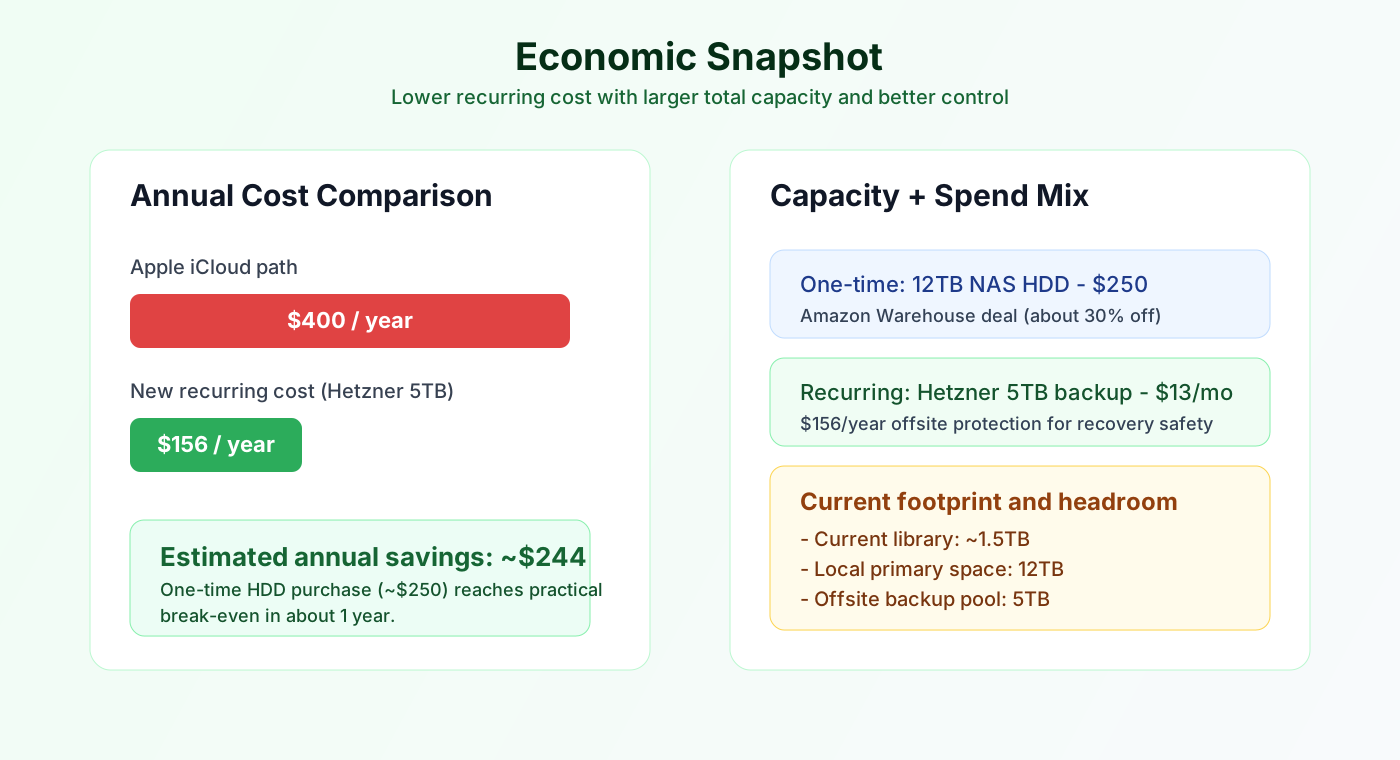
- One-time hardware cost: $250 for a 12TB NAS-grade HDD (IronWolf deal from Amazon Warehouse)
- Compute cost: $0 incremental (I reused my existing homelab Proxmox VE server and deployed Docker there)
- Ongoing backup cost: $13/month for Hetzner Storage Box (5TB)
What I Get For That Spend
- Local primary storage: 12TB on home NAS
- Offsite backup storage: 5TB in Hetzner Storage Box
- Current library size: ~1.5TB (family photo/video library), with room to grow significantly
Comparison vs iCloud
- Previous direction: pay about $400/year for Apple iCloud at my required scale
- Current recurring cost: about $156/year for offsite backup storage
That is roughly $244/year lower recurring cost, while giving me much larger total capacity and better control.
If I include the one-time $250 disk purchase, the setup still reaches practical break-even in about a year and then keeps compounding savings afterward.
Final Takeaway
Building a personal photo cloud at home was not just a cost optimization project.
It was a control-and-peace-of-mind project.
Cloud is still part of my system, but no longer the single point of pricing pressure, storage policy, and migration friction. My data now lives on infrastructure I control, with backup paths I understand, and expansion choices I can make on my own timeline.